A nicer version of multitasking

0

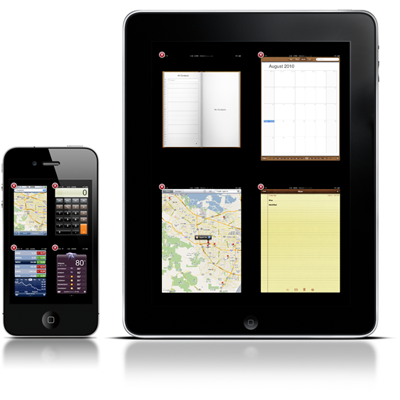
If you have ever used a mac, you may be familiar with "Exposé" a nice way of showing you what apps are currently running on your computer and allowing you to easily switch between them. Unfortunately, in my opinion, the way iOS shows you what apps are open and how to switch between them isn't great at all; it only shows four apps at a time and takes ages to close apps that you no longer want to run.

Fortunately for jailbroken phones there is an alternative, multifl0w, which is essentialy exposé for your device.

In order to install this, you will need to jailbreak your phone (read about this here) and have http://repo.insanelyiph0ne.com/ added to your sources in cydia (read about this here)

Once you have done the above open the above source in the "sources menu" in Cydia and scroll down to "multifl0w" and install it. After your device reboots you will have the software installed!

The software is configured to work how multitasking normally works but it can be changed to be activated in different ways inside the settings menu on your phone.

The devlopers have a website which can be found here

Let me know what you think of this great piece of software below!


TOP STORY! iPad 2 to be announced 2nd March!

2

As posted here on engadget Apple has scheduled an event for 2nd March where the "iPad 2" is set to be announced.

Rumours have been spreading over the past few months about what the next iPad will bring to the table in order to keep it ahead of the competition. I would speculate that the next iPad will include at least one camera (front mounted) for video calling and double the RAM of the old iPad to keep it inline with the iPhone 4. It would be nice to see the next iPad also sporting a "retina display" though this should not be counted upon just yet.

More to follow as details emerge. I will post any information that comes from this event on this blog.

UPDATE #1
more rumours can be found here

The iPhone's strongest rival?

0

Although it may already be clear that I believe the iPhone 4 to be the best phone money can currently buy, it is always good to see strong competing devices as this forces Apple to improve their own product in order to compete. Also, I think it will be interesting for me to write about a different phone for a change.

There are a large quantity of operating systems on the market, but personally I think Google's Android platform is the closest competitor to iOS and one Android phone in particular has caught my eye

The Google Nexus S - The best android phone ever?

There are several reasons that I think this phone is great, but unfortunately the price is not one of them. Retailing at £539 at the time of writing on Expansys makes this phone one of few phones on the market to be more expensive than a base 16gb iPhone 4. Bad start admittedly.

This phone goes with one of the major features of most current flagship Android handsets, a large superAMOLED display. These screens are great and tend to look more impressive than the display found on an iPhone 4. Unfortunately the resolution cannot match the iPhone 4 but it is not bad at 960*640 pixels.

An important thing to consider when buying an Android handset is that because there are so many different phones available, some may get updates faster than others. Fortunately the Nexus S ships with Android 2.3 installed and as Google's flagship device, I would expect it to receive updates before almost all the other Android phones. A great positive.

The camera is on a par with the competition with a 5 megapixel sensor, standard fare in modern smartphones and can also record 720p high definition video, which is also pretty standard. It is good to see the back of the days when awful cameras were fitted to smartphones such as the original and 3g iPhones.

The phone has 16gb of built in storage (a nice and slightly unusual feature for an Android phone) and 512mb of RAM which should help with multitasking. The battery is also huge at 1500mah.

It is great to see Google putting their name on a phone in a similar way to how Apple creates the software and hardware for its devices. The fact is, as Google's top handset this phone should enjoy excellent support until a new "Googlephone" is released at least. The huge number of handsets available with Android makes it hard for any phone to stand out inside the Android ecosystem and I think Google may be onto a winning formula by providing their own product with no ties to a handset manufacturer (however it should be noted that this particular phone is based on the Samsung Galaxy S).

In short, if you are looking for a new smartphone, but for some reason do't wish to buy an iPhone, or are looking for a phone with a large screen I would suggest giving the Nexus S a try, especially if you are particularly interested in an Android handset.

If you believe I have missed something out, or wish to share your experiences with this phone, please leave a comment below!


Why Windows Phone 7 is (over) 2 years behind iOS

2
Having intended to do a comparison of the various mobile operating systems with the objective of finding which is best, upon starting my research it dawned on me that Windows Phone 7 (WP7) is very similar to an early iteration of iOS.

Having used WP7, it is clear that Microsoft have come up with a very strong product, but with many missing feature and the same could have been said in 2008 of Apple's iOS. Having realised this, I compiled the following table to illustrate the shortcomings of early iOS (2.0) and the current version of WP7.

Feature

Microsoft Windows Phone 7

Apple iOS 2.0

Apple iOS 4.0

Number of apps

8154

(16/02/2011)

15,000 (16/01/2009)

400,000+

(16/01/2011)

Cut/Copy/Paste

No

No

Yes

True Multitasking

No

No

Yes

Apps “freeze” when phone locked

No – app must be reloaded

Yes

Yes

Universal Search

No

No

Yes

Threaded email

No

No

Yes

Universal email inbox

No

No

Yes

Application sorting

Alphabetical only

User defined

User defined with folders

Home screens

1

9

11

Battery % indicator

No

No

Yes

OSX Syncing

Beta only

Yes

Yes

Public transport map directions

No

No (added in 2.2)

Yes


The first and biggest problem with WP7 that will likely keep it behind the competition is the lack of third party apps available for the device. It does not seem unreasonable to suggest that no matter how many adopters the platform gains, it seems realistic to expect there to be less than 100,000 apps available for the platform by the end of 2011 (I will enjoy looking back at this prediction at the end of the year!)

For a supposedly "business orientated" system, the lack of threaded email, unified email inbox and universal search seem to be a major oversight on the part of Microsoft. These features were all missing from iOS 2.0, but were added one year later with the release of i0S 3.0. Personally, I have rarely required the service of any of these three features, but considering the number of complaints about iOS whilst these features were not present, it seems these features must be important to a number of individuals.

The way Microsoft promotes the supposed "customisation" of it's software also seems to differ from what is offered in reality. Whilst it is a nice option to have widgets (a feature which iOS still lacks) in WP7 this feature comes at the expense of the ability to put the application on a phone into a chosen order, standard practice on iOS and Google Android, and the applications can only be viewed in alphabetical order. Also, WP7 offers only ONE customisable screen, when even iOS 2.0 offered NINE customisable screens.

I would class the "battery percentage indicator" as a minor annoyance rather than a missing feature really, but to me, it would be an inconvenience with the lack of battery time modern phones have. This should be a very simple update for WP7.

Another missing feature, OSX syncing is obviously only relevant for those using OSX which, by most estimation is around 10% of the market. This feature isn't really missing, but beta support could be buggy.

The lack of public transport directions on maps could be an annoyance to those wishing to use their phone as a transport timetable and was a great addition to iOS back in 2008. I feel that Microsofts insistence to using Bing maps rather than (in my opinion) the far superior Goolgle maps could be at fault here.

Although this post may come across as being non-objective, I feel it does highlight the fact that WP7 is not yet a mature operating system and the purpose of the post is also to highlight the development iOS has experienced since its inception. Personally I think that WP7 is a much better start for Microsoft than iOS 1.0 was for apple, but when they released iOS, Apple set the benchmark for future mobile operating systems and it seems unlikely that WP7 would be anything like it is if iOS had not come into existence.

It will be interesting to see what happens to WP7 as it develops. Personally I am hoping it will mature into a great OS, as the more competition iOS has, the better it will need to become.

If you enjoyed this post or have any suggestions for future posts please leave a comment below!

- @nkbish0p
APP HIGHLIGHT 4: Dropbox

0

For long term readers of this blog, todays post may bring back a memory of a similar post that I wrote back in June 2010, but this app is so great and seeming still uncommon enough to inspire me to once again sing its praises.

Unusually, this article is actually relevant to anyone that owns any kind of smartphone with either iOS, Android or Blackberry OS or anybody that owns a Windows, OSX or Linux based computer. To me that seems like everyone!

The purpose of dropbox is to back up your important files online, and allow you to access them from any computer anywhere in the world. (You do not even need the app installed on the computer you wish to get your files on, but you will need the app on a computer if you want the documents to be updated and uploaded automatically). Installing the app on your smartphone allows you to also access these documents without even having access to a computer.

As usual in my app highlight section, Dropbox is totally free for 2gb of storage space in which to back up your documents, which can be absolutely any type of file that you wish. Users wishing to store more than this can either pay money to increase their storage space up to 200gb or refer friends to dropbox, giving a bonus 250mb of space whenever a friend signs up.

The beauty of dropbox, and to me what sets it apart from its competitors is that it is RIDICULOUSLY EASY TO USE. For totally fail safe backups and peace of mind all you need to do is install dropbox on your computer, and save any documents you wish to be backed up online into the "dropbox" folder that the program will create. (When installing the software on a computer there is a great tutorial which displays automatically explaining exactly what to do).

By trying this software you have nothing to lose, in all honesty I think it is genuinely one of the best pieces of software around at the moment and is extremely well executed. For anybody with important things on their computer that they do not wish to lose (seems to happen to everybody at somepoint) I would urge you to give dropbox a try by downloading at the link below!


Some Statistics

5
As the choice of mobile operating systems has expanded over the past four or so years, the rivalries between the OS manufacturers have grown stronger and this has filtered down to the users of each system, with many users liking to claim that their OS whether it be iOS, Android, Windows or even Symbian is the "best". Of course, the best operating system is objective, depending what you aim to use it for and how well each fits your need, so the point of this article is not to get my viewpoint on this across (though I am planning to write an article on this in the near future) but to answer another important question. Which operating system is the most commonly used?

This topic has been hotly debated, as different statistics can seem to show a different outcome, but for this article I will be focusing on UK USERS ONLY as this is the primary audience for this blog. I will be comparing the percentage of the market that each provider has and also the growth.


It can be seen on the graph that iOS is currently the most popular OS in the United Kingdom, with a market share of over 40%, just ahead of RIM's blackberry which has a share of around 38%. It should however be noted that the market share of iOS is falling steadily, which could be down to the growing popularity of Google's android, which now has around 13% of the market.

From the graph I would predict that the likely dominant mobile OS's for the near future will be iOS and Android. Personally I find it staggering how popular Blackberry actually is, considering the advantages of both Android and iOS over this platform. (For example, iOS has over 400,000 apps, Android over 250,000 whilst Blackberry users have less than 17,000 to choose from).

it must also be noted that in the next few months, Microsoft's windows phone 7 platform will likely make an appearance on the graph as a stand alone OS. In my opinion it is likely that business users will switch from Blackberry to Windows Phone 7 as the blackberry platform seems outdated and suffering from a lack of innovation. (I am currently in the process of writing an article about Windows Phone 7, check back soon for that!)

In conclusion, if you are looking to buy a new phone and have an interest in using your phone to download apps as well as to stay inline with the competition in terms of updates and progression I would strongly advise against buying anything other than an Android or iOS handset, at least until Windows Phone 7 has matured slightly and it becomes obvious where this platform stands. It should be noted that the more users a platform has, the more apps and software will be developed for it; for an example compare Windows and Mac OSX, as windows has far more users, far more developers have developed far more programs and software for it. Although iOS had a huge head start (it was released before Android) giving it it's huge market share it will be interesting to see over the coming months whether Android becomes the primary platform for developers to work with (this will be strongly influenced by worldwide usage, as android has a much stronger user base worldwide than in the UK). I think it is a foregone conclusion that before long, more applications will be available for Android than iOS. What will happen to Blackberry however remains to be seen...

Let me know what you think about your phone and/or operating system in the comments below!


How to improve battery life on your iPhone

2


Note I: This article is not relevant for the original iPhone as it does not have 3g
Note II: This article requires an application to be installed that requires your iPhone to be jailbroken. To find out how to jailbreak your phone, read this

One common issue people often have with owing a smartphone is that the battery lift is often not as good as desired. There are many ways to extend the battery life of your device, such as lowering the brightness of the display, or switching off mobile data when not required. However, the second option is not ideal as it prevents you from receiving emails or push notifications. It is well known that having 3g switched on has a strong negative effect on the battery life of an iPhone, but it would be inconvenient to switch 3g on and off all the time manually. Todays app allows 3g to be switched on when your phone is unlocked and switched off, returning to a gprs or edge connection when the phone is locked, allowing push notifications and emails to come through as normal without the battery drain of constantly having 3g switched on.

Auto 3g: How to install

  1. Make sure your device is jailbroken, and if it isn't use this to jailbreak it.
  2. Add this source: http://repo.insanelyiph0ne.com/ using this guide
  3. In sources, tap the above source
  4. Scroll down to Auto3g
  5. Tap "install" and follow the instructions on screen
  6. After installing, if when you open Auto3g you get a piracy message, go into settings on your device and switch aeroplane mode on, then back off again. If this does not remove the message switch your phone off then back on again.
The app itself is quite self explanatory when you start using it, but if you have any problems contact me below or via twitter @nkbish0p.