March: This month's most popular posts

0
How to play gameboy games on your iOS device
A look at some emulators for the iOS range.

Availability and pricing for the newest iPad model

A brief look at the newest iPad

full look at the unveiling of iOS 4.3 and the iPad 2


A look at a great, free alternative tethering method for jailbroken iPhones

Thanks for reading my blog, March 2011 was the most popular month yet and I hope to provide more great posts over the next few weeks and months.
Please follow me on twitter @ibb0Nk for latest news !


No iPhone 5 this year? Here is what you should do instead!

0

With rumours here, and here suggestion that there may not be a new iPhone released this year by Apple, as there has been the past 3 years at WWDC in June or July, I put forward my opinion as to what you should do whilst waiting for your shiny new iPhone 5.

Two questions:

  1. Do you already have an iPhone and is your contract going to end before July?
  2. Do you want an iPhone and would prefer to have the newest (and best) one?
If you answered yes to either of those, take a second to read the rest of this post (if you didn't, feel free to read it anyway, it could save you a lot of anguish later on!

If you don't want to buy an iPhone, then see it replaced by a new model shortly afterwards, I suggest that you keep your current handset right up until the day the new iPhone is released.

Now unfortunately network providers can be sneaky. If your contract ends when you are not near the point of a new iPhone coming out, they will probably try and pressure you into having another phone, an "upgrade" as they will probably call it, leaving you wishing you had waited for the next iPhone when it actually comes out.

The solution?

If your contract has expired, switch to a SIM ONLY plan and keep your current phone right up until a new iPhone is released. That way you get the latest phone, first, and you save a tonne of money in the months of using your SIM only plan.

There are many many SIM only plans on the market and it is hard to tell which one offers the best value. Fortunately, you don't need to trawl through them all because I have done it for you and found the very best deal available in the UK.

Giffgaff are a new company in the UK that use the o2 network. There are several plans available and each plan can be cancelled with 30 days notice (Similar to a 30 day SIMplicity plan from o2). There are several advantages to these deals:

  • No long term contract - plan can be cancelled with no penalty with only 3o days notice.
  • True unlimited data - o2, vodafone, t-mobile and orange all don't offer this, 3 only offer it with a £25 per month 12 month contract.
  • The company use o2 network - on your phone in the status bar it will say o2, only on the SIM will giffgaff be mentioned. In my opinion o2 are the best network in the country.
There are some things to consider however.

  • Your phone must be unlocked to use this SIM - either get your service provider to unlock it for you (most providers will if your contract has expired) or read this to find out how to unlock your phone yourself.
  • GiffGaff don't allow you to use the built in tethering function with your iPhone but if you read this you can tether without them knowing.
I would also like to note that I am not affiliated in any way with GiffGaff and will not make any money as a result of people signing up to the network. I genuinely believe that this is the best deal you will be be able to get in the UK.

For more details, visit the website here

Thanks for reading! Please leave feedback!


how to enable four and five finger gestures on an iPad, free

0
With some beta firmwares in iOS 4.x, apple included an option to use 4 and 5 finger gestures on the screen of the iPad to complete the following tasks:

-Pinch to return to the home screen
-Swipe up to reveal the multitasking bar
-Swipe left or right between apps

Unfortunately these were never options for those of us without access to the beta firmwares, until now. These gestures can be added easily and quickly to your device without even requiring a jailbreak! Unfortunately for those without an OSX system however, you will need to borrow a friends mac.

To enable the gestures do the following:

  1. Download xcode 3 from here. Install and make sure that it is fully updated.
  2. Launch the app and connect you iPad to your computer, it should show up in the devices list in xcode,
  3. Click the "use for development" button
  4. When asked to input your developer credentials, hit cancel. Ignore the error.
  5. Go to your iPad general preferences and enable multitouch gestures.
A good video of these gestures in action can be seen here

Thanks for reading, for more cool tweaks, why not read how to jailbreak your device here
-@ibb0Nk


Angry Birds Rio for iOS : Review

0

Before you read any of the review below, yes, you should buy Angry Birds Rio. The Angry Birds franchise is probably the very best gaming iOS has to offer and the success of the original app and it's sequel "Angry Birds Seasons" speak for itself. The app is only 59p and the vast quantity of updates that it's two predecessors received (And the updates this one will also receive, more later) make this app an absolute bargain. So unless you have no interest at all in gaming in any form on your iPhone, iPod touch or iPad (or OSX or Windows, versions for both of those are coming as well as other phone platforms) you should buy this app right away.

Onto the review.

Angry Birds Rio is a new game in the same way as all the updates to it's two preceding games were not games. That is, it's not really a new game. Although it is a standalone app, everything in the other two games is still present (except the pigs) and the app is more like a new collection of levels that complements the levels already released. To put it another way, the content of this app could have easily been added as an update to the previous game, but, to be honest after the wealth of free updates that game has already received, I think it is fair of the developers to expect customers to pay another 59p.

There are some changes. The graphics of both the game and the interface are much better for a start, but a game like Angry Birds isn't selling for it's graphical merit, more it's addictive gameplay. I am pleased to say that after spending the majority of the past 24 hours playing, this new title exhibits the same pick up and play nature as its two predecessors.

Maybe even more so in fact, as for me it was very refreshing to start the game as it was released rather than be confronted by the daunting number of levels the old game now has, it is nice to start with only 60 levels to complete, then work through the new ones as the app is updated. The app will be updated 4 times, between now and November and if the quality of the updates can match that of the updates the preceding apps received, Angry Birds Rio will have the ability to maintain your interest for the next 8 months and beyond.

Another new feature to the franchise are "boss fights" one of which is present in the included levels. It remains to be seen whether this will become a staple feature of the series.

Unfortunately, several improvements that I feel should have been made haven't made their way into the game. Considering how useless game centre has turned out to be, I think it would have been nice for the developer to add a "facebook connect" style feature (Like in doodle jump) where you can log into your account in the app to compare scores with your friends. At the moment, unless you wish to add all your friends manually via game centre, this is not really possible.

Again, borrowing an idea from doodle jump (incidentally you can find my review for that here) I think the developers could have incorporated some kind of "counter" or "timer" to keep count of how many times each level has been played and how long has been spent playing the game. This would be good as a use to promote further competition between players, for example, there could be a leader-board where players are ranked by how fast they completed each section or how many attempts it took them.

Thirdly, I would have liked to have seen some kind of replay mechanism, where, after completing a level you could view the strategy you used to complete it and maybe show it to a friend who is having trouble.

Overall then I would say that this app is more "Angry Birds 1.5" than "Angry Birds 2". It makes use of a few small additions, but the core gameplay is essentially the same as the two predecessors. You may see this as a good thing, after all the two other games were both great, but time will tell whether Angry Birds can maintain its popularity without making use of innovation. Maybe "Angry Birds 2" will provide the innovation that I am looking for.

Overall - 7/10

If you liked the other two games, you will like this. If you are looking for something new, this isn't it.

PS - if you are playing, add me on game centre - bish7751
Thanks for reading!


How to get your iPad 2 in the UK

0
Uk release times and prices have today been confirmed by Apple.

The iPad 2 will be released at 01:00am online from apple.com and 17:00 from Apple retail stores as well as "selected Apple resellers" (think shops like KRCS)

The iPad 2 prices are as follows:

iPad 2 WiFi only:

16gb - £399
32gb - £479
64gb - £559

iPad 2 WiFi and 3G:

16gb - £499
32gb - £579
64gb - £659

More information about the iPad 2 and a recommendation as to which model is likely to suit your needs can be found here.

If you are desperate to get an iPad 2 I would advise an early purchase as they are likely to sell out fast. Once they are sold out it could take a while for more to be shipped.

Thanks for reading @ibb0Nk

Better notifications for the iPhone

0
If the last 3 years have anything to go by, within a month or so we should know what is coming in iOS 5.0, which, if the regular pattern is followed will be released in Summer 2011. One of the few obvious problems left in the iOS OS is its relatively poor handling of notifications (take a look at an Android phone and see how much better theirs is) with intrusive on screen pop-ups and no log of what each notification was if a number are unread, save for a red "badge" on the app concerned.

It seems very likely that iOS 5.0 will include a new way to manage notifications, but if you don't want to wait until then there is a solution. As you might expect this is only available to jailbroken users.

Preperation
This part is fairly recurrent on this blog - skip if you have seen it before.

  • You will need a jailbroken iPhone. To read how to do this, read this page
  • You will need to add the source www.sinfuliphonerepo.com (If you don't know how to do this read this post
Installation

  • Open cydia, tap manage, tap sources, tap sinfuliphonerepo.
  • Find "lockinfo cracked" and install it.
  • If you want a clock added too, install "lock info clock plugin" too.

Lockinfo

This tweak is pretty customisable, you can set which categories you want to have on your lockscreen. You can also access this by swiping down on the status bar at the top of your screen. The app also lets you set status bar notifications and you can add widgets such as the clock and calendar mentioned above.

If you don't like this, Intelliscreen is pretty similar so why not give that a try instead?

Thanks for reading!

How to avoid getting ripped off if you want to tether

0

I find it extremely annoying that even if you pay for a set amount of data to use per month with your iPhone, or iPad 3g that if you wish to share your internet connection with another device (Such as a laptop) most carriers expect you to pay an additional fee to do this.

In my opinion this isn't fair, I pay for 1gb of data to use per month and due to great WiFi coverage where I mainly use my device, I usually finish the month with around 900mb of this data still intact. However, if I wanted to tether my iPhone 4 to a laptop, I would have to pay for more data to do this and would not be allowed to use the remainder of my 1gb allowance for tethering.

Fortunately there is a jailbreak app that allows you to do this and in this post I will explain how to do this for free.

  • You will need a jailbroken iPhone. To read how to do this, read this page
  • You will need to add the source www.sinfuliphonerepo.com (If you don't know how to do this read this post
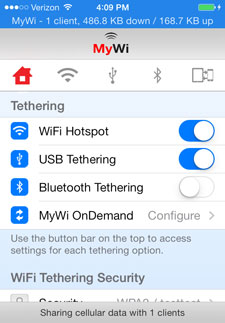
The app you will need to install is called MyWi.

  • Tap search in cydia and type in "MyWi"
  • Install "MyWi 4 cracked".
  • Allow your device to reboot and MyWi 4 should be installed.
MyWi works in much the same way as the mobile hotspot functionality in iOS 4.3 except your carrier cannot tell that you are tethering your device. This means the data used by MyWi comes out of your regular monthly data allowance. Be mindful of your monthly limit - tethering uses up data faster than you thing especially when streaming video or downloading. If you wish to do a large amount of browsing it may be a good idea to use a browser such as Opera that compresses web pages before downloading in order to conserve your data allowance.

The app is pretty easy to use, but if you have any questions feel free to ask away below!


Thanks for reading!