Tweet
Todays post takes a a slightly different approach to the majority of my posts, where as a rule, I tend to champion Apple's products, particularly the iPhone and iOS. There are several things however that I hate about Apple and I will highlight these in the list below.
iPhones are too expensive
An easy inclusion and one that would probably make the number one slot on most peoples list, regardless of whether they like Apple or not. Forgot what people say about "paying for quality" or "craftsmanship", yes the iPhone 4 is well made, yes the software is excellently polished but I still consider the iPhone 4 to be overpriced in todays market. For a start, the frankly ludicrous £428 price tag of a two year old handset (the iPhone 3gs) is a stupendous waste of money and I believe that it is probably set that high to encourage consumers to spend an extra £90 or so to buy a 16gb iPhone 4. Equally ludicrous is the extra £102 a 32gb iPhone 4 costs over a 16gb iPhone 4, an upgrade I did not even consider due to the massive overpricing. When equally competent Android handsets can be bought for much less, I grow more and more tempted to make my next phone a non-Apple model.
You may question the relevance of these prices if you bought your phone from a network provider on contract, but a quick look on Vodafones UK website shows that the probably superior Samsung Galaxy S II can be taken away for free with the purchase of a £36p/m contract. Remembering that the iPhone 4 is now a year old handest, it seems ludicrous that to get a free iPhone 4 customers are expected to pay £40p/m. Expect these prices (And price gaps) to grow even larger with the debut of the next iPhone handset.
You cannot (easily or officially) downgrade the firmware on your device
To most people this may seem irrelevant. However, as an owner of an iPhone 3g I found my phone to be incredibly slow once updated to iOS 4.0, (and I am not alone) and promptly downgraded it back to iOS 3.1.3. There are rumours going around that in iOS 5.0 Apple will make it almost impossible to downgrade your phones firmware once you have updated it. I will find it incredibly annoying if I witness similar problems that I experienced with iOS 4.0 on my iPhone 3g with iOS 6.0 on my iPhone 4, especially if I have no choice but to live with it. I find it appalling that Apple can sell a user a device that is rendered practically useless by a so called "update". Users should always have the choice of returning their device to the software that they purchased it with.
Innovation, although fairly frequent is slowly paced.
Take for example the addition of MMS, cut copy and paste and video recording that took an entire two years for Apple to implement. Apple should listen to their users and it was clear for an extremely long period of time before this that people wanted to see some of these features on their device. The increased competition from Android is great as it is forcing Apple to include features such as these that they may not have even bothered with if good alternatives were not available.
Banned apps
I think it is fairly ridiculous that Apple wishes to operate a "family style" app store and not allow certain apps to be sold within it. I believe that customers that pay this much to use an Apple product should be allowed to install applications of their own choice at their own leisure. Alternative app stores (that do not require a jailbreak unlike Cydia) would be a fantastic addition to iOS. Personally, I can't see this happening as Apple takes 30% of all revenue generated by sales in the App Store. However, other mobile platforms such as Android do benefit from this option.
Apple "fanboys" and Apple "haters"
They exist and they are annoying to non users and users of Apple products. It is unfortunate to be labelled as a "fan-boy" purely due to a usage of Apple products and it is annoying when people make judgements about products, be it Apple or non Apple products without considering the benefits and drawbacks first. I bought my iPhone 4 because I genuinely believed it to be the best all around smartphone on the market when I made the purchase, though as this post demonstrates I believe Apple should not be immune to criticism. There are pros and cons for each mobile platform and each has unique features that make it suitable for a certain person or a set of requirements. Competition is good and it is great that there are a multitude of options available on the market as this makes sure that each manufacturer is required to work hard to stay competitive.
What don't you like about your iPhone/iPod Touch/iPad? Leave a comment below!
Apps with friends
Tweet
In this app review, I will be looking at a trilogy of iPhone apps that are meant to be played as multi-player games with your friends. All three apps rely on push notifications to notify the other player that it is their turn to have a go, similar to how people take turns playing board games with the added bonus that the two players can play at their own pace and do not have to be in the same room or even country. In fact, as each of these titles allow matches with random opponents, the players involved may no have even met. So far there are three games in the series, words with friends, chess with friends and hanging with friends. Each are available in the app store as ad-supported free versions or paid versions which remove the ads.
Words with friends
Undoubtedly the most popular of the three apps here. Words with friends is based on the popular board game scrabble which I am sure that most readers are familiar with already. The game uses a slightly modified scrabble board (probably for copyright reasons) but apart from this the rules are exactly the same. This app is great as a game of scrabble normally has a relatively low number of turns before the game is completed compared to some other board games. This means that even at an extremely relaxed pace a single game should last no longer than a week or so. If too long a period of tie elapses without one player taking their turn, that player forfeits the game. The ads in the free version appear after a player has taken their turn and must be dismissed before continuing. The paid version of the app removes all of the adverts and costs only £0.59 so is recommended for those that enjoy the application.

Hanging with friends
Based on the game "hangman" but surprisingly confusing. The first player forms a word out of a given selection of letters and is awarded points depending on which letters are used (bizarrely in a manner similar to that of scrabble, the letters must be arranged across a set of squares that can include multipliers such as "triple word score" or "double letter score". Each letter has its own point value similar to in scrabble). Strangely there seems to be no purpose of the accumulated points and they have no influence on the outcome of the game. Once a word is selected a notification is sent to the other player prompting them to try and guess letters that are in the chosen word. If a letter is chosen that is not in the word a ""life" is lost. Once all lives are lost the word is classed unsolved. If a player fails to solve 5 words that the other player has created they lose the game. Ads appear similarly to "words with friends" and again, an ad free version is available for £0.59.

Chess with friends
For those that have previous experience playing chess on an iOS device, it is great to know that you no longer have to rely on computerised opponents that just can't seem to be the same as playing against a real player. This app is pretty self explanatory but it is worth noting that as some chess games can contain a large number of moves before a match is completed, games played in this app can take a long period of time to be completed. Surprisingly, it costs £1.79 for the paid version of this app and the free version contains ads similar to the other two apps. It may be worth waiting for any possible price reductions before purchasing the paid version of this app as at the moment, to me, it seems slightly overpriced.


In short, as each app has a free version and all are great fun, I recommend trying all three today!
Leave an opinion below!
Words with friends
Undoubtedly the most popular of the three apps here. Words with friends is based on the popular board game scrabble which I am sure that most readers are familiar with already. The game uses a slightly modified scrabble board (probably for copyright reasons) but apart from this the rules are exactly the same. This app is great as a game of scrabble normally has a relatively low number of turns before the game is completed compared to some other board games. This means that even at an extremely relaxed pace a single game should last no longer than a week or so. If too long a period of tie elapses without one player taking their turn, that player forfeits the game. The ads in the free version appear after a player has taken their turn and must be dismissed before continuing. The paid version of the app removes all of the adverts and costs only £0.59 so is recommended for those that enjoy the application.
Hanging with friends
Based on the game "hangman" but surprisingly confusing. The first player forms a word out of a given selection of letters and is awarded points depending on which letters are used (bizarrely in a manner similar to that of scrabble, the letters must be arranged across a set of squares that can include multipliers such as "triple word score" or "double letter score". Each letter has its own point value similar to in scrabble). Strangely there seems to be no purpose of the accumulated points and they have no influence on the outcome of the game. Once a word is selected a notification is sent to the other player prompting them to try and guess letters that are in the chosen word. If a letter is chosen that is not in the word a ""life" is lost. Once all lives are lost the word is classed unsolved. If a player fails to solve 5 words that the other player has created they lose the game. Ads appear similarly to "words with friends" and again, an ad free version is available for £0.59.
Chess with friends
For those that have previous experience playing chess on an iOS device, it is great to know that you no longer have to rely on computerised opponents that just can't seem to be the same as playing against a real player. This app is pretty self explanatory but it is worth noting that as some chess games can contain a large number of moves before a match is completed, games played in this app can take a long period of time to be completed. Surprisingly, it costs £1.79 for the paid version of this app and the free version contains ads similar to the other two apps. It may be worth waiting for any possible price reductions before purchasing the paid version of this app as at the moment, to me, it seems slightly overpriced.

In short, as each app has a free version and all are great fun, I recommend trying all three today!
Leave an opinion below!
All about iOS 5.0
Tweet
It's great to be back writing my blog again after a pretty hectic month with firstly a lack of time to write and secondly a slight problem with blogspot. Fortunately, with my first blog written after this brief hiatus, I have something great to write about!


On monday 6th June, Apple announced iOS 5.0, the latest version of iOS which is set to be released in "fall" this year, along with all the new features it contains. I have been using a beta version of iOS 5.0 on my iPhone 4 for a few days now (look out for a post as to how you can try this out yourself soon) and am going to use this opportunity to explain what exactly iOS is, what it does, who it is for and how good or bad it is.
Firstly, iOS 5.0 will be made available for the iPhone 3gs, the iPhone 4, iPod touch third and fourth generations and both the iPad and the iPad 2. Older devices will not be supported and it is expected that these older devices will receive no more software updates in the future.
There are many, many new features in iOS 5.0 (200 in fact according to Apple) but some are more important than others. Below I will outline the most important new features and what exactly they do.
Notification centre (and widgets)
iOS 5.0 brings a complete overhaul of the way your device handles notifications (such as text messages, facebook comments and twitter @replies), and not before time. Basically swiping down from the status bar at the top of the screen on your device brings down a drawer containing all unread notifications as well as widgets for stocks and weather (these widgets can be disabled in settings). Nicely done using an idea borrowed from Android and to me the most important new feature of iOS.


iMessage
Similar to BBM but for iOS users only. The usual features to this type of chat client are present such as the ability to send messages without using SMS messages, the ability to send pictures and group chat. There is no need to mess around with "PIN" numbers as it is all automatic. Hopefully this will spell the beginning of the end for RIM (read why i dislike Blackberry here). To be honest, this kind of service appeals little to me and I will probably leave this feature turned off, though for lovers of BBM, whatappmessenger or liveprofile, this feature should be a great alternative.

Newsstand
Another feature that appeals little to me, Newstand is essentially iBooks for magazines, and magazines can be downloaded from the app store. Pretty simple and could have been released as an app rather than a feature built into the OS in my opinion. Strangely, iBooks is a standalone app that does not ship with iOS devices and I wish newsstand was the same.

Reminders
Basically a simple reminder app. You set an appointment or event and the time and date of its occurence and your device provides you with a reminder at the desired time. The only really cool feature of this app is that reminders can be set to be triggered by gps, so you could set a reminder if on the train for the station before the one you need and your device would prompt you when you arrived there. Again, in my opinion this should have been made available on the app store or be built into the clock app.

Twitter integration
Twitter is now built directly into iOS allowing you to tweet a photo without opening a twitter client and connecting twitter usernames to contacts in your phonebook. Pretty cool but twitter users will still probably also need a twitter application.

Camera and photography improvements
Some cool new additions here such as a camera button on the lockscreen allowing you to take a photo without needing to unlock your device (a feature borrowed from windows phone 7). The volume + button can now be used as a shutter button which I consider to be an excellent improvement and grid lines can be put onto the camera viewfinder. There is also the ability to lock the autofocus and exposure as well as pinch to zoom. Editing capabilities have been built into the photos app with features such as crop and red eye reduction.

iCloud and PC free setup, updating and syncing
As well as announcing iOS 5.0 at WWDC, Apple also announced their new cloud storage solution iCloud which is similar to the rival service dropbox (which i have written about previously). Basically iCloud allows content such as apps, music and photos to be copied to all of your devices over the internet without the need for cables or iTunes.
With iOS 5.0, iOS devices will become PC free. This essentially means they will be able to be setup out of the box, synced and updated without the need to ever plug your device into a computer. Fortunately, iOS updates will now only contain the new features and not the whole code for iOS making updates much smaller downloads. Most of these features have been available previoulsy with the aid of a jailbreak, but from when iOS 5.0 is introduced, a jailbreak will no longer be required to enjoy this great functionality.

Although this post covers the main new features of iOS 5.0, there are many, many more features including:
- iPod app changed to "music" and "videos" apps.
- Alternate routes in maps.
- Rich text formatting and flagging in email.
- Desktop like tabs in safari
- Safari reader (saves pages for offline reading)
- Keyboard shortcuts for phrases eg ms could be set to correct to metres squared.
- Facetime over 3g
- Custom SMS tones and vibration patterns.
Look out for more posts on iOS 5.0 over the next few days!
Have I missed something? Let me know below!
How to make your data allowance last longer with Onavo
Tweet
With most iPhone price plans or contracts now offering "capped" data plans as opposed to the unlimited ones previously offered, it can be very frustrating not being able to use the data services on your phone when you reach your limit, or having to pay for extra data. Today's app allows your data allowance to last for up to 80% longer, and like most of my favourite apps, it's also totally free.


The first thing to notice about Onavo is its awesome icon. Totally random, yet in my opinion very cool and nice looking. But that's irrelevant, so onto what the app actually does. Once installed on your device, Onavo prompts you to install a new "profile" onto your phone. Once this is done, all of the data you use on your phone over a mobile internet connection (not WiFi) is routed through Onavos servers and compressed. This has two big benefits. Firstly, it means that the speed of your data connection should improve substantially and secondly each thing requiring data that you do on your phone will use less data than before. This means you will be able to use more of the data features on your phone that you would be able to without the app, without going over your monthly limit. This could also be very useful when abroad, where some carriers charge you per megabyte used. Using this app would use less megabytes and result in smaller charges.
A nice feature of the app is that you install it, set it up and forgot about it and it just works. Setting up is easy, you just need to install the profile when prompted and hit the "turn savings on" button. Once this is done, even when the app is quit all of your data will still go through Onavos servers and be compressed.
The app also offers a statistics section, which is great if you enjoy looking at statistics or would like to know where most of your data allowance is going. It also lets you know how much less data you have used by using the app than you would have used if you had not.
Unfortunately the app does not compress YouTube videos or other live streams though the developers say that they are working on this and it may be provided in a future update.
The app is totally free, so probably worth a shot even if you think you don't need its awesome features.
Had a go with this app? Let me know in the comments below!


The first thing to notice about Onavo is its awesome icon. Totally random, yet in my opinion very cool and nice looking. But that's irrelevant, so onto what the app actually does. Once installed on your device, Onavo prompts you to install a new "profile" onto your phone. Once this is done, all of the data you use on your phone over a mobile internet connection (not WiFi) is routed through Onavos servers and compressed. This has two big benefits. Firstly, it means that the speed of your data connection should improve substantially and secondly each thing requiring data that you do on your phone will use less data than before. This means you will be able to use more of the data features on your phone that you would be able to without the app, without going over your monthly limit. This could also be very useful when abroad, where some carriers charge you per megabyte used. Using this app would use less megabytes and result in smaller charges.
A nice feature of the app is that you install it, set it up and forgot about it and it just works. Setting up is easy, you just need to install the profile when prompted and hit the "turn savings on" button. Once this is done, even when the app is quit all of your data will still go through Onavos servers and be compressed.
The app also offers a statistics section, which is great if you enjoy looking at statistics or would like to know where most of your data allowance is going. It also lets you know how much less data you have used by using the app than you would have used if you had not.
Unfortunately the app does not compress YouTube videos or other live streams though the developers say that they are working on this and it may be provided in a future update.
The app is totally free, so probably worth a shot even if you think you don't need its awesome features.
Had a go with this app? Let me know in the comments below!
Grooveshark - A music streaming service for iOS
Tweet

One of the features many people wish to be added to iOS is the ability to stream music. For those unfamiliar with this, streaming music is when rather than keeping music files on your iPhone, they are stored externally and you listen to them over the internet. This has two great advantages; firstly you don't have to buy any of your music as streaming legally allows you to listen to whatever you like, provided somebody has uploaded it. Secondly, it frees up space on your iDevice as you don't need to keep any music files on your device.
I'll start by saying that there are tonnes of ways to stream music to your iPhone and the most popular option is Spotify. However, I'm not going to be reviewing Spotify, rather, I am going to be reviewing what I consider to be the best alternative, Grooveshark.
Before you try the app, I suggest you try the website. It's great. Unlike Spotify you don't need to download any software (great if you are using a computer that isn't your own) and you also don't need to make an account (great if you can't be bothered with things like that).
But this review is for the iOS app for Grooveshark so i'll get back to that. Firstly, it is important to note that bizarrely the app is available in Cydia only and not the official App Store due to Apple having rejected it. So before you try it out you will need to jailbreak your device. Don't let this put you off however, Grooveshark is one of the best designed Cydia applications I have ever seen and looks nicer than many of the apps available in the "real" App Store.


The app comes with a 14 day (or 50 song) trial. This is great, if, like me you aren't really sure if you need a streaming client for your iPhone. After the trial, the service costs $9 per month (abut £5.50 today, which is £4.50 cheaper per month than Spotify).
I tested it out by searching for some pretty obscure music and the app didn't let me down (though if you do have an issue with finding something, please let me know!). The app also lets you download songs to your phone for offline listening, which is great if you are going somewhere without adequate coverage and don't wish to lose access to your music.
There are the half-standard sharing options including Facebook and Twitter if you wish to let other people know what you are listening to. You can also set "favourite" tracks and see the most listened to tracks. You can also make playlists.
Sound quality is better than I expected, though it may not be enough to please audiophiles and can be adjusted between high and low bitrate in the app settings.
In summary, if you want to try streaming music on your phone, this is a great place to start. The 14 day trial should be a long enough period to get a feel for the service and after this period the monthly subscription of less than £6 makes this service great value for money. For a jailbreak app the quality is far beyond average and I would not let the fact that this app is Cydia only put you off!
9/10
Thanks for reading!

One of the features many people wish to be added to iOS is the ability to stream music. For those unfamiliar with this, streaming music is when rather than keeping music files on your iPhone, they are stored externally and you listen to them over the internet. This has two great advantages; firstly you don't have to buy any of your music as streaming legally allows you to listen to whatever you like, provided somebody has uploaded it. Secondly, it frees up space on your iDevice as you don't need to keep any music files on your device.
I'll start by saying that there are tonnes of ways to stream music to your iPhone and the most popular option is Spotify. However, I'm not going to be reviewing Spotify, rather, I am going to be reviewing what I consider to be the best alternative, Grooveshark.
Before you try the app, I suggest you try the website. It's great. Unlike Spotify you don't need to download any software (great if you are using a computer that isn't your own) and you also don't need to make an account (great if you can't be bothered with things like that).
But this review is for the iOS app for Grooveshark so i'll get back to that. Firstly, it is important to note that bizarrely the app is available in Cydia only and not the official App Store due to Apple having rejected it. So before you try it out you will need to jailbreak your device. Don't let this put you off however, Grooveshark is one of the best designed Cydia applications I have ever seen and looks nicer than many of the apps available in the "real" App Store.

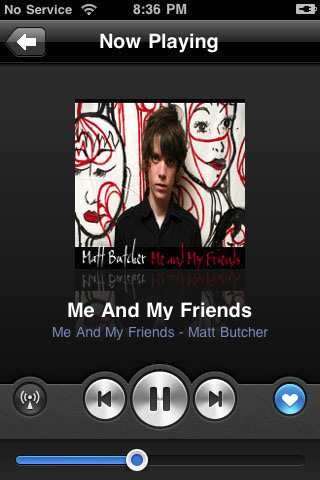
The app comes with a 14 day (or 50 song) trial. This is great, if, like me you aren't really sure if you need a streaming client for your iPhone. After the trial, the service costs $9 per month (abut £5.50 today, which is £4.50 cheaper per month than Spotify).
I tested it out by searching for some pretty obscure music and the app didn't let me down (though if you do have an issue with finding something, please let me know!). The app also lets you download songs to your phone for offline listening, which is great if you are going somewhere without adequate coverage and don't wish to lose access to your music.
There are the half-standard sharing options including Facebook and Twitter if you wish to let other people know what you are listening to. You can also set "favourite" tracks and see the most listened to tracks. You can also make playlists.
Sound quality is better than I expected, though it may not be enough to please audiophiles and can be adjusted between high and low bitrate in the app settings.
In summary, if you want to try streaming music on your phone, this is a great place to start. The 14 day trial should be a long enough period to get a feel for the service and after this period the monthly subscription of less than £6 makes this service great value for money. For a jailbreak app the quality is far beyond average and I would not let the fact that this app is Cydia only put you off!
9/10
Thanks for reading!
Jailbreak information for iOS 4.3.3 added
Tweet
The jailbreak information for the latest iOS firmware, iOS 4.3.3 has been added to the jailbreak page. The method of how to complete the jailbreak can also be seen in this post here.
Thanks for reading.
Thanks for reading.
My (current) favourite iOS twitter client
Tweet
Firstly, sorry for the lack of posts recently, due to impending exams I may post less frequently across this month but normal service will return in June.
If you use twitter, you are probably already aware that there are a wealth of "clients" that you can use in order to access your twitter account. Compared to Facebook, for which pretty much everybody seems to use the same default Facebook application, on twitter many people prefer to use applications other than the default official Twitter client. Personally I tend to change between clients on iOS quite frequently but at the moment I am settled with a great new Twitter app, Tweetbot.
Tweetbot
£1.19
get it here


If you use twitter, you are probably already aware that there are a wealth of "clients" that you can use in order to access your twitter account. Compared to Facebook, for which pretty much everybody seems to use the same default Facebook application, on twitter many people prefer to use applications other than the default official Twitter client. Personally I tend to change between clients on iOS quite frequently but at the moment I am settled with a great new Twitter app, Tweetbot.
Tweetbot
£1.19
get it here


The first thing that drew me to Tweetbot was its fantastic interface. It looks brilliant compared to most of the other twitter clients that either use the default iOS style theme or try and create their own style which mostly ends up looking pretty much horrendous (referring to Tweetdeck in particular). Tweetbot has a simple and clean layout that is a refreshing change for the somewhat stale appearance of iOS after 4 iterations. For me to consider an app to be great it must be wasy to use and have a fantastic appearance and in my opinion Tweetbot ticks both of these boxes.
Secondly, Tweetbot adds (or makes easier to utilise) features that are missing from other twitter clients, or that are present but much less obvious or easy to use. For example, if you flick your finger to the left whilst holding down on a tweet Tweetbot will show tweets related to the one selected such as replies to that particular tweet. I think this is a great way to access this feature and not all Twitter clients even include this functionality. Flicking to the right in the same way shows the conversation preceding the tweet selected.
Tweetbot also includes a translate feature which is useful if you want to understand users posting in a foreign language, which can be fairly common when reading top trending tweets.
Apart from this, Tweetbot offers the standard set of features associated with Twitter applications including support for multiple twitter accounts. One neat feature is the ability to set one of your "lists" as a default timeline, which is an uncommon feature in iOS twitter apps.
Unfortunately there are several things that Tweetbot does not support but mostly these things don't concern me (though they may concern you). Primarily, Tweetbot does not support push notifications which may seem silly for a non-free twitter client. This would be a deal breaker for me, but if you install "Boxcar", a free application from the app store this will enable twitter push notifications.
The app also does not support a landscape keyboard which I didn't even notice until I read it in the reviews. I very rarely bother using the portrait keyboard as I much prefer the landscape one but for those of you that prefer a landscape keyboard this is being added in the next app update. "Twitlonger" style services are also not supported, this being down to the choice of the developers and this functionality seems unlikely to be added in in the future.
In summary this app is by far my favourite Twitter client and has taken the place of Echofon and the official Twitter app for me on my iPhone. I can understand that paying for a twitter app that doesn't offer a whole lot more functionality than the free alternatives may cause some people to look elsewhere and this has been reflected in my rating. If you don't mind spending a little cash though, I highly recommend giving this app a try!
7/10
Subscribe to:
Posts (Atom)
